
Using Typography
A guide to implementing the included Perihelion typography styles and elements into your site as well as instructions for inserting typography using the HTML editor option of your WYSIWYG editor. Every RocketTheme template has its own set of content styles, these styles are known as Typography. Typography can come in a number of varying and […]
Logo Editing
The following is a step by step guide to customising your Perihelion logo image by replacing the logo text with your own organisation or company’s name and logo. In order to utilise the Fireworks Source PNG included with the perihelion template release, you will need Adobe Fireworks. The 30-day free trial of this software as […]
Basic Customisation
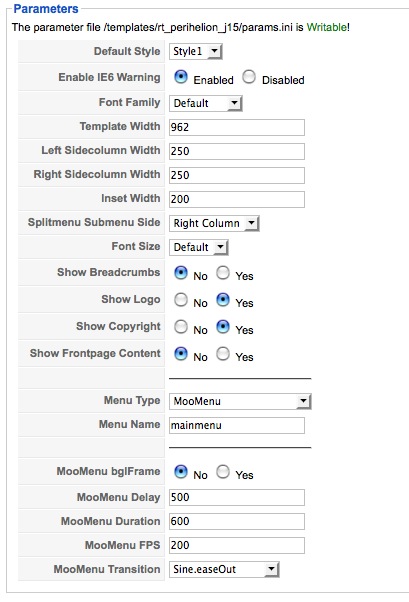
A guide to the basic Perihelion customisation options that can be configured in the template manager with a description of each of the available options and how they affect the presentation of the template. Here is a breakdown of the available options: Default Style The template is bundled with 5 pre-made style variants that be […]
Menu Options
Perihelion features the exciting and exclusive RokMooMenu system for the ultimate in menu functionality and style, as well as the popular and reliable RTSplitMenu. An option for Suckerfish is also included. Here you can read an overview of the Perihelion menu configuration options. Selecting your Menu Style Perihelion allows you to choose from 3 menu […]
Custom Modules
Learn all about the exciting new RocketTheme exclusive modules that are included in the Perihelion template release. Here you can find instructions for installation and configuration for each of the custom modules/scripts. Video Tutorial Currently Available! Launch the Joomla Template Module Installation Video Tutorial now! (Requires Flash) Step One: Installing the Module Download the perihelion-extensions-j15.zip […]
Installation
The following is a guide that covers how to set up your new Perihelion template on your Joomla site. Here you can find an overview of the files included in the Perihelion release and instructions on installing and activating the template in your Joomla install. Video Tutorial Currently Available! Launch the Joomla Template Installation Video […]
Tutorials

Installing Perihelion An overview of template files and instructions for installing and activating the template. Read More… Custom Modules Learn all about the included Perihelion custom modules and how to configure them for your site. Read More… Menu Options An overview of the Perihelion menu options including the top menu icon configuration. Read More… Customisation […]
Typography
This page shows all of the typography styles and settings for perihelion in action. If you would like to read more detailed information on inserting the included typography into your content, check out the Perihelion Typography Tutorial. Font Control Perihelion allows you to have the option of simply switching the font of all the text […]
Module Variations
Perihelion has 2 module class suffixes. They allow you to change the style of the module itself. These are -banner (this loads the ribbon-type banner in the User4-6 area) or -accent (this adds a solid styled background for the User7-9 area). To use these, just add the hilite names in the module class suffix parameter […]
Module Positions
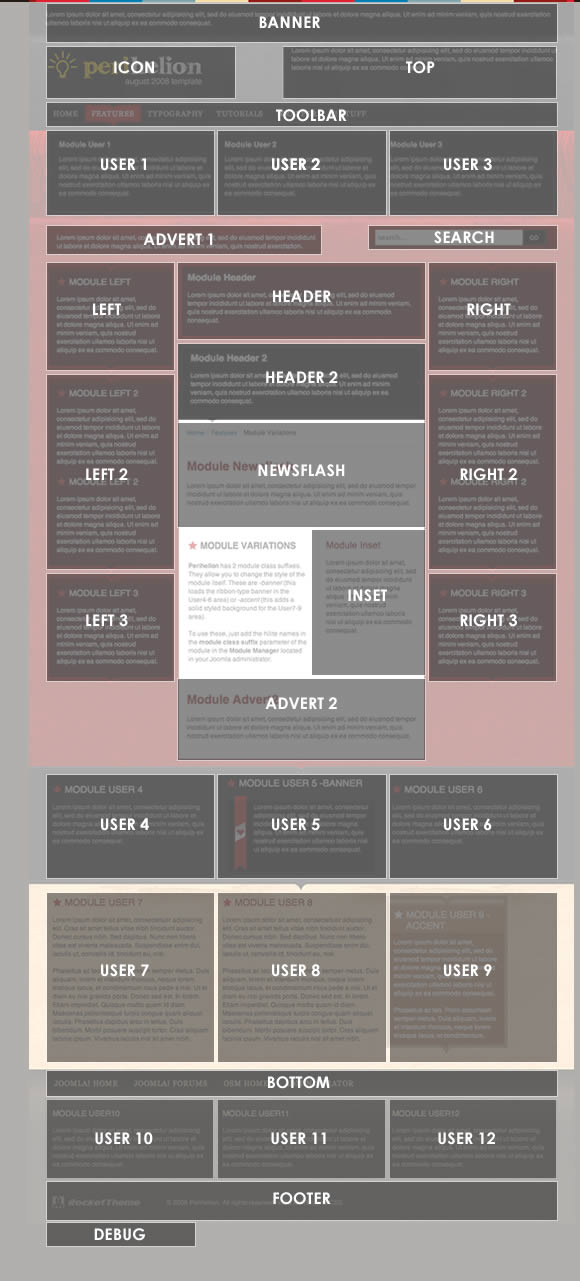
Perihelion has been constructed with an assortment of 32 module positions allowing for one of the most versatile designs ever. Most of these module positions are fully collapsible meaning that if there are no modules published in particular area, that module area will not be shown. This provides you with the maximum amount of flexibility […]